MetaTrader 5: A Complete Guide for Prop Firm Traders
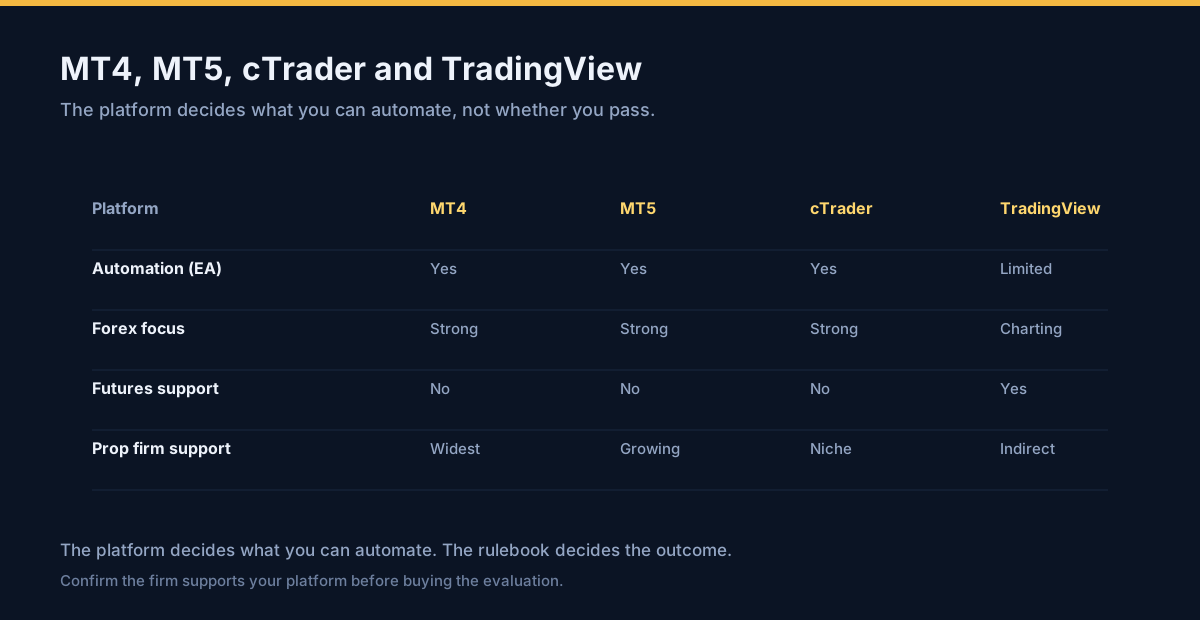
MetaTrader 5 is where most evaluations are actually traded, and most guides to it explain the toolbar. This one covers the parts that decide whether a funded account survives: the account type that governs how every order behaves, the order types worth knowing, what the platform does when your connection drops, and what the strategy tester will never tell you about your firm's rules.
Getting an account onto the platform
Install the firm's build, not a generic one
Prop firms configure their own server list and sometimes their own build of MT5. Use the download and login details the firm issues rather than a client from MetaQuotes, because the server has to be present for the account to connect.
Log in to the issued account
File, then Login to Trade Account, and enter the login, password and the server exactly as the firm gives them. The server field is the part that is usually wrong when a login fails.
Confirm the account type
In the Navigator, right-click the account and open its properties. Note whether it is a netting or hedging account, the account currency, and the leverage. Each of these changes how your orders behave.
Add the instruments you need to Market Watch
Ctrl+U opens the symbol list. Only instruments shown in Market Watch can be charted or traded.
Check the symbol specification
Right-click a symbol in Market Watch and open Specification: contract size, tick value, minimum stop distance and swap rates are all there. The minimum stop distance is what produces the Invalid stops error.
Netting versus hedging — the setting that changes everything
Before you place an order, know which type of account you have, because the two behave completely differently:
| Netting account | Hedging account | |
|---|---|---|
| Positions per symbol | One, always | Many, independently |
| Sell while holding a buy | Reduces or closes the buy | Opens a separate short |
| Stops and targets | One set, on the single position | One set per position |
| Common at | Most CFD and futures-style accounts | Many retail FX brokers |
This matters beyond hedging rules. On a netting account, an order meant to "add" to a position can silently reduce it, which is how traders end up flat when they believed they were doubling up. Confirm the type from the account properties and write it down.
The order types worth knowing on a challenge
| Order | What it does | Why it matters on an evaluation |
|---|---|---|
| Market | Fills now at whatever price is available | Fastest, and the only type with no guaranteed price. Attach the stop in the same ticket. |
| Pending limit | Fills at a better price than the market | Lets you define entry, stop and target together before you are in the trade. |
| Pending stop | Fills at a worse price, on a breakout | Useful for momentum entries, but the fill price can slip in fast conditions. |
| Stop loss | Closes a position at a worse price | The only setting that converts an open-ended loss into a known one. |
| Take profit | Closes a position at a better price | Turns an intention into an exit that happens without you. |
The practical advantage of a pending order with attached levels is that the trade is fully specified before it exists. Nothing can go wrong in the interval between entry and adding risk controls, because there is no interval.
What happens when the connection drops
This is the most consequential thing most traders never test. The behaviour depends on where each piece of logic lives:
- Stops and targets attached to a position are generally held with the position and survive a local disconnection.
- The trailing stop is client-side and stops trailing the moment the terminal closes — explained in detail here.
- Expert Advisors run in the terminal. If MT5 is closed, the EA is not running, and any management logic it performs stops with it.
- Alerts are local notifications, not orders.
Decide this before the trade, not during it
If any part of your risk management depends on the terminal being awake, then the terminal being awake is a dependency of your strategy. On a challenge that runs for weeks, that dependency will eventually fail. Either move the critical logic server-side — resting orders rather than managed positions — or accept the exposure knowingly.
The strategy tester, and its blind spot
MT5's strategy tester will run an Expert Advisor or a manual strategy against historical price data and report profit, drawdown, win rate and trade statistics. It is useful for filtering ideas and for finding out whether a rule set behaves as you believe.
The blind spot is absolute: the tester does not know your firm's rules. It has no concept of a daily loss limit, a trailing drawdown floor, a minimum trading day count, a consistency ratio on the profit being withdrawn, or a payout cadence. A strategy can produce a flawless equity curve in the tester and be structurally unpassable on the account — for instance by making all its profit in one enormous session, which a consistency rule caps at payout.
| Tester reports | Tester cannot report |
|---|---|
| Net profit, drawdown, win rate | Whether a daily limit would have been breached |
| Trade-by-trade results | Whether a trailing floor would have ended the account |
| Profit factor and expectancy | Whether the profit distribution satisfies a consistency rule |
| Time in market | Whether enough qualifying days were traded |
So back-test for the strategy, and check the rules by hand. The two questions are separate, and only one of them has software.
Making the setup repeatable
The features that look like decoration in a beginner tutorial are the ones that make a challenge survive weeks rather than days:
- Templates — save a chart layout with your indicators and levels so every session starts from the same screen.
- Profiles — save a whole workspace, so a crash or a new machine restores the environment rather than rebuilding it.
- Journal and history — the Toolbox history tab is the record you will need at payout and at tax time.
- A VPS — only if something must run while you are asleep. What a challenge actually needs from a VPS is usually far less than what is sold.
Frequently asked questions
The FAQ block covers what MT5 is, how it compares with MT4, netting versus hedging accounts, the strategy tester's limits, whether a VPS is needed, and protecting stops when the connection drops. Related: setting a stop loss in MT5, which platforms firms use and daily drawdown explained.
What is MetaTrader 5?
Is MT5 better than MT4 for prop firm trading?
What is the difference between a netting and a hedging account in MT5?
What does the MT5 strategy tester not tell me?
Do I need a VPS to run MT5 for a challenge?
How do I stop MT5 losing my stop loss when the connection drops?
Have a question before you commit?
Ask us anything about your firm, your account size or whether a passing service suits you. Two ways to reach us, both answered by a person: Telegram @voraspas, or email support@elitepropx.com. No forms, no queues.
Ready to pass your prop firm challenge?
Flat $220 per evaluation — we trade it for you and hand over a funded account. No hidden cuts, no monthly fees. Send your firm and account size on Telegram or by email and we will confirm availability, the current rules and the timeline.